Lecture 11: Image Processing

HTML Slides html │ PDF Slides PDF  │ Demo code on GitHub GitHub

Topic overview#

  • Image representation
  • File formats and compression
  • Preprocessing for image recognition tasks

Resources used:

Images as 2D signals#

  • The light that enters a camera can be modelled as continuous signal: $$f(x, y),\space -\infty < x, y < \infty$$
  • Digital images are sampled: $$f[n, m], \space n = n \Delta_x, m = n \Delta_y$$ where typically $\Delta_x = \Delta_y$
  • The area $\Delta_x \times \Delta_y$ is called a picture element, or pixel
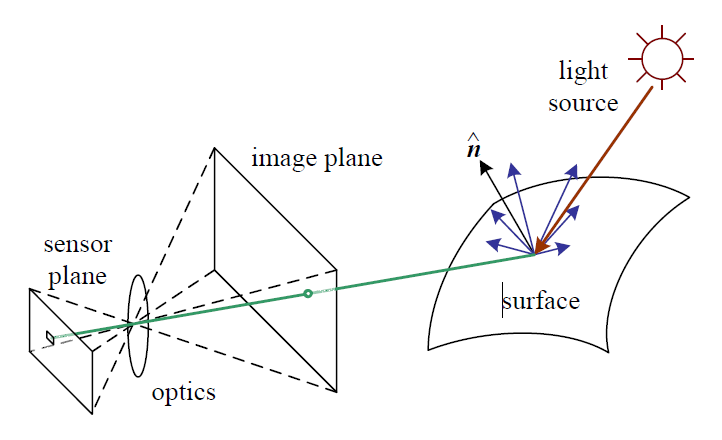
Image channels#

  • A photosensor responds to light intensity with an electrical signal
  • Physical filters restrict the colour that reaches each sensor
  • On most digital cameras, 1 sensor $\ne$ 1 pixel; it is instead interpolated to create a typical 3-channel image
  • (Inexplicably, the Python imaging library Pillow uses the term “band”)

bg right:25% 85%

Bayer sensor pattern diagram by en:User:Cburnett - Own work, CC BY-SA 3.0, Link

Images as (3D) 2D arrays#

  • Size (np.shape) usually defined as [rows, cols, (channels)]
  • Typical 8-bit image: integers from 0 to 255
    • For processing, common to convert to float and normalize
  • RGB examples of individual pixels:
    • [255, 0, 0]
    • [128, 128, 128]
    • [255, 255, 255]

Portable Network Graphics#

  • PNG is an image format released in 1996 as a GIF replacement
  • Typically 8 bits per channel, but can be 1, 2, 4, 8, or 16
  • 3x RGB channels, plus an optional alpha (transparency) channel
  • Space saved in two ways:
    • Indexed colour, where numbers map to a finite set of colours
    • Lossless compression, e.g. [0 0 0 0 0 0 0] $\rightarrow$ 7 0

What kinds of images would benefit from this compression scheme?

Joint Photographic Experts Group#

  • JPEG is an image standard released in 1992 for photographic images
  • Lossy compression based on human vision:
    1. Channels converted to YCbCr colourspace
    2. The colour components (Cb/Cr) are downsampled 2-3x
    3. Blocks of 8x8 pixels are transformed to frequency domain
    4. Amplitudes are quantized with larger buckets at higher frequencies
    5. Finally, lossless compression is applied
  • The “quality” of a JPEG relates the degree of quantization

Where we left off on March 24#

A Cautionary Tale of Image Classification#

  • As convolutional neural networks (CNNs) gained popularity as image recognition powerhouses, people started using them for all sorts of things
  • One example: predicting whether someone is a criminal based on a photo
  • Thoroughly debunked in a paper that mentions, among other issues:
    • Criminal samples are all 8-bit greyscale PNG photographs of printed images, taken with the same camera
    • Non-criminals are RGB JPEGs from 5 different sources, converted to greyscale to be “compatible with mugshots from the criminal category”

What’s the problem here?

Preparing images for machine learning#

  • As with audio, images should be consistent
  • Let’s check out some public datasets
  • Two approaches:
    • keep raw data and process on the fly (e.g. ImageNet)
    • apply some preprocessing and store (e.g. CIFAR-10)
  • Common to do a bit of both, e.g. resize and save with consistent format, then apply various transforms during both training and inference

As usual, there is a tradeoff between time and space

Image Transformations#

  • Geometric transforms resize, rotate, skew, shift, etc
  • Point operators independently change each pixel, e.g. histogram equalization
  • Linear filters compute new pixel values from a weighted sum of values in a small neighbourhood
  • Nonlinear filters compute new pixel values from a small neighbourhood in a nonlinear fashion

Resizing#

  • For computer vision purposes, most images need to be resized
  • Most often, a square aspect ratio is used
    • Can be rotated 90 degrees without modifying code
    • Simplifies parameter specification
    • Maybe some CUDA advantage if divisible by 8 (e.g. $224 \times 224$)
  • Resizing needs interpolation (or resampling), and distorts aspect ratio
  • Alternatively (or additionally), image crops can be used

Where we left off on March 26#

Linear Filters: Convolution#

  • A filter or convolution kernel is a small (usually) square matrix that gets convolved with the image: $$(f * g)[n, m] = \sum_{i=0}^{n}\sum_{j=0}^{m} f[i, j]g[n-i, m-j]$$

  • Fun fact: this is the same as multiplication in frequency

center

Beyond linear filters#

  • Linear filters are simple weighted summations, and form the core of convolutional neural networks, widely used in computer vision
  • Sometimes, nonlinear effects are useful, such as:
    • Median image filtering to reduce certain types of noise
    • Morphological operators for binary image masks

There is a huge world of image processing, including techniques for segmentation, feature detection, registration… too much to cover in this course!

Tools#

In addition to Pillow and the usual numpy, matplotlib, scipy libraries:

  • ImageMagick is a command-line tool that can be combined with bash scripting to process a bunch of images, e.g.:
    mkdir resized
    for img in *.jpg; do
       magick $img -resize 512x512! resized/$img
    done
  • OpenCV has functionality overlap with Pillow, but also computer vision algorithms
  • Torchvision provides load-time transformations for use with deep learning models
  • ITK is the OG classical image processing toolbox focused on medical imaging

What about videos?#

  • There are an absurd number of video formats
  • Most common: MPEG4 container, H.264 video, AAC audio
  • Containers can hold video, audio, subtitles, chapter information, etc
  • Often video-only data is treated as a series of images (e.g. Kinetics)
  • New considerations:
    • Temporal (re)sampling
    • Dataset splitting!!

Coming up next#

  • Image processing lab
  • Assignment 3 due soon
    • Ask me for help!
  • Data augmentation and generation